Happy New Year: composing music in SQL
My previous New Year posts were about drawing pictures in SQL: snowflakes, clocks, fractals and even our planet Earth as seen from above.
But contrary to the popular belief, SQL is not just about graphics processing. You can use it for all kinds of things.
Today we'll use SQL to create music.

Remember those polyphonic ringtones in early 2000's cell phones? Instead of downloading MP3's (which were a pain to download and even more pain to upload them to the phone), you could type in the notes and their values, and the phone would play them for you.
Most phones played tunes in a very straightforward way: for each note, they calculated its frequency and generated a pure sine waveform of this frequency. Polyphonic phones could play several notes at once: this would require two or more superimposed waveforms. Math behind that are very simple: channel amplitude is a sine function of time and frequency, and all the channel amplitudes are added together.
Let's do this too and play some New Year music with PostgreSQL.
SQL Server: deleting with self-referential FOREIGN KEY, handling loops
From comments to one of my previous posts: SQL Server: deleting with self-referential FOREIGN KEY
In my case the query goes to infinite loop.
If I use
OPTION (MAXRECURSION 365)orOPTION (MAXRECURSION 3267), it fails when reaching highest recursion value.If I use 0 (which is infinite) the query runs for an hour with no output.
I understand it is a data related issue which is causing infinite loop, but I cannot control the data being sent to the DB.
Any other way we can handle it?
Thanks,
Jay
That's a common situation, and we would sometimes need to clean the mess up (i. e. remove the whole loop).
To do this, we would just need to add a little check condition to the recursive CTE.
We just record the topmost entry (or better say the entry we first use in the loop, as there is obviously no topmost entry), and check if we ever come across it again as we do the recursion.
Once we have it on next iteration, we know it's a loop and it's time to stop.
Here's how we do this:
CREATE TABLE TestComposite (
        id INT NOT NULL,
        siteUrl NVARCHAR(255) NOT NULL,
        name NVARCHAR(MAX) NOT NULL,
        parentId INT NULL,
        PRIMARY KEY (id, siteUrl),
        FOREIGN KEY (parentId, siteUrl) REFERENCES TestComposite (id, siteUrl)
)
GO

INSERT
INTO    TestComposite
VALUES  (1,  'site1', 'name1', NULL),
        (2,  'site2', 'name2', 4),
        (3,  'site2', 'name3', 2),
        (4,  'site2', 'name4', 3),
        (5,  'site5', 'name5', NULL),
        (6,  'site5', 'name6', 5)
GO

WITH    q (start, id, siteUrl) AS
        (
        SELECT  id, id, siteUrl
        FROM    TestComposite
        WHERE   id = 2
                AND siteUrl = 'site2'
        UNION ALL
        SELECT  start, tc.id, tc.siteUrl
        FROM    q
        JOIN    TestComposite tc
        ON      tc.parentID = q.id
                AND tc.siteUrl = q.siteUrl
        WHERE   tc.id <> q.start
        )
DELETE
FROM    TestComposite
OUTPUT  DELETED.*
WHERE   EXISTS
        (
        SELECT  id, siteUrl
        INTERSECT
        SELECT  id, siteUrl
        FROM    q
        )
We had a loop on 2 -> 3 -> 4 which is gone after the query.
See this query on SQL Fiddle.
Top 5 XKCD comics which can illustrate programming questions
As many of you know, I actively participate on Stack Overflow, the leading Q/A website for software developers.
Kind folks on Stack Overflow have made their data open for examination, and anyone can query their database using this web interface at data.stackexchange.com.
Many of the questions and answers there are illustrated with links to XKCD, the web comics created by Randall Munroe.
So I decided to see which of those comics best illustrate quirks and oddities we keyboard warriors have to deal with in our daily routine.
The query itself is quite simple:
SELECT  link, cnt, id [Post Link], score
FROM    (
        SELECT  link, id, score,
                COUNT(*) OVER (PARTITION BY link) cnt,
                ROW_NUMBER() OVER (PARTITION BY link ORDER BY score DESC) rn
        FROM    (
                SELECT  id, score,
                        'http' + SUBSTRING(start, 1, PATINDEX('%/%', SUBSTRING(start, 13, 30)) + 12)
                FROM    (
                        SELECT  id, score,
                                SUBSTRING(body, PATINDEX('%://xkcd.com/[0-9]%', body), 20) start
                        FROM    (
                                SELECT  TOP 400000
                                        id, body, score
                                FROM    posts
                                ORDER BY
                                        id DESC
                                UNION
                                SELECT  TOP 4000000
                                        postId, text, score
                                FROM    comments
                                ORDER BY
                                        id DESC
                                ) q
                        WHERE   body LIKE '%://xkcd.com/[0-9]%'
                        ) q
                ) q (id, score, link)
        ) q
WHERE   rn = 1
ORDER BY
        cnt DESC
The TOP clauses are there to limit the query size, as their hosting provider does now allow fulltext indexing, and without them the query would just time out. This query only searches recent comments and posts, so some famous and top-voted posts might not be present here. Still, it's a good sample.
You can see all results here, and we'll just discuss the top 5 entries.
#5. Random Number (10 links)
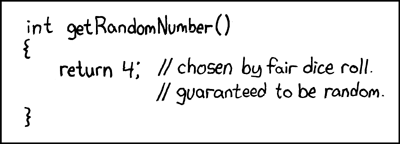
Of course the questions which link to it deal with random number generators of any kind and fallacies in their implementation.
Happy New Year: drawing fractals in SQL
In one of my previous New Year's posts we drew snowflakes in PostgreSQL.
The algorithm we used to create the snowflakes is an implementation of an L-system, which is an example of a fractal. There are many more beautiful objects we can see in the winter: frozen trees, frost patterns on windows, cracks on ice etc., all of them being fractals.

Today we will be constructing escape-time fractals. To build such a fractal, one would need to run a certain function for each point on the plane iteratively and see how many iterations does it take for the function to overflow: the more it takes, the brighter is the point's color.
I won't go deep into fractal theory now, just show that they can be constructed with SQL relatively easily. For instance, Mandelbrot set, one of the best known escape-time fractals, is almost a one-liner in PostgreSQL:
5 Claims About SQL, Explained
1. Is SQL is a declarative language?
First of all, let's define the terms.
A declarative language describes the result, not the process to achieve it. In a declarative language you tell "what do I need".
A procedural language describes control flow: exact steps the machine needs to perform in order to achieve this result. In a procedural language you tell "what do you do".
SQL, as it was originally designed, is a declarative language.

For instance you need to know how many customers above 40 live in each city. You issue a query like:
NULL in SQL: explaining its behavior
On my blog feedback page I get lots of questions which essentially boil down to one thing: "Those NULL things in databases work in a way I don't freaking get!"
Let's have them explained a little.
The Wikipedia page defines NULL this way:
Introduced by the creator of the relational database model, E. F. Codd, SQL Null serves to fulfill the requirement that all true relational database management systems (RDBMS) support a representation of "missing information and inapplicable information".
…
For people new to the subject, a good way to remember what null means is to remember that in terms of information, "lack of a value" is not the same thing as "a value of zero"; similarly, "lack of an answer" is not the same thing as "yes" or "no".
Rather than trying to come up with intuitive rules for how NULL behaves, it's easier to expand on the definition above to demonstrate the motivation behind introducing the NULL at all, and why it ended up so complex.
NULL is like an "unknown variable" in algebraic equation
Let's step away from relations and tables for a moment, and remember some old school math. What is this?
Did You Know You Could Index SUM() and COUNT(): SQL Server Indexed Views, Part 3
Comments enabled. I *really* need your comment
A friend of mine who owns a stock photo website once told me he had designed an awesome photo auto-tagging algorithm which was 80% correct: just tag all photos cats and have four hits out of five.

But seriously, how do we calculate most used tags on photos?
For those not familiar with different tagging models, I highly recommend this old but very useful article: Tags: Database schemas.
Now, in this tutorial, we'll use the toxi approach to tagging. Later in the article I'll explain why we would choose that approach over the others.
Let us create a simple schema which would allow us to store, tag and sell photos:
Storing a Friendship: SQL Server Indexed Views, Part 2
You're building a social network and want to store who is friends with whom. OK. Let's assume you want Facebook-style friends: by agreeing to be friends with someone you allow them to be friends with you too. This is called a symmetric relationship and if your social model sticks to that kind of relationship, your application should enforce its symmetry.
How shall we store friends in a database table? There are several options.
Initiator first
A table with one record per friendship and two fields for each of the friends. The person who requested the friendship is stored in the first field:
10 things in SQL Server (which don’t work as expected)
Comments enabled. I *really* need your comment
10. Unique NULL
![Snowflake_300um_LTSEM[1]](https://explainextended.com/wp-content/uploads/2013/07/Snowflake_300um_LTSEM1-e1374253595235.jpg)
When declaring UNIQUE constraints on columns, SQL Server treats all NULL values as unique. This means you can't have more than one NULL value in a unique column.
This behavior violates the standard and is specific to SQL Server.
To work around this, implement the constraint by declaring a UNIQUE index which would exclude NULL values:
Score charts, friendship lists and unique multiple columns: easy with SQL Server’s indexed views
Comments enabled. I *really* need your comment
SQL Server supports a really useful feature called indexed views. This means it lets you materialize results of some queries and build indexes over them. It’s as if you haven’t actually run the query yet - but it’s already complete, stored conveniently on the disk for you, ordered and waiting for you to read its results. Not all queries are eligible but some quite often used by the database developers are.
In this series, I'll describe three scenarios which could really benefit from using indexed views.
Scenario One: Unique multiple columns
Assume you are building a database for multiplayer online tic-tac-toe tournaments. The first thing you’d want would be recording game results: who played with whom and who won. This can be easily achieved with a simple layout:
| id | round | x | o | winner | start | duration |
|---|
Now we have additional requirement: no person should be able to play in a tournament more than once. How do we do that?
Read the rest of this entry on tech.pro »
 Subscribe in a reader